
Optimized Package Builds
Parrot Security provides optimized package builds that target modern CPU instruction sets for improved performance on recent hardware. This page explains what they are, which packages are currently covered, how to confirm your CPU is compatible, how to enable them, and the technical details behind the feature.
What are optimized builds?
Section titled “What are optimized builds?”Every standard amd64 package in Parrot Security (and in Debian, on which Parrot is based) is compiled to run on the original 64-bit x86 instruction set defined in 2003. This guarantees that a package runs on any 64-bit machine, regardless of age. The same principle applies to the standard arm64 packages, which target the original ARMv8.0 baseline.
The trade-off is that these packages cannot use any of the CPU features introduced after that baseline — features that modern processors have offered for years.
Optimized builds are recompiled versions of selected packages that target a newer instruction-set baseline:
| Component | Architecture | Target | Key features enabled |
|---|---|---|---|
amd64v3 |
x86-64 | x86-64-v3 |
AVX, AVX2, FMA, BMI1, BMI2, MOVBE, F16C |
arm64v8.2 |
AArch64 | armv8.2-a + extensions |
LSE atomics, DOTPROD, FP16, cryptography |
These instructions accelerate common operations such as compression, encryption, hashing, media processing, and numerical computation. Depending on the workload, the speedup ranges from negligible (for I/O-bound tasks) to substantial (for compute-bound tasks such as cryptography, compression, and media encoding).
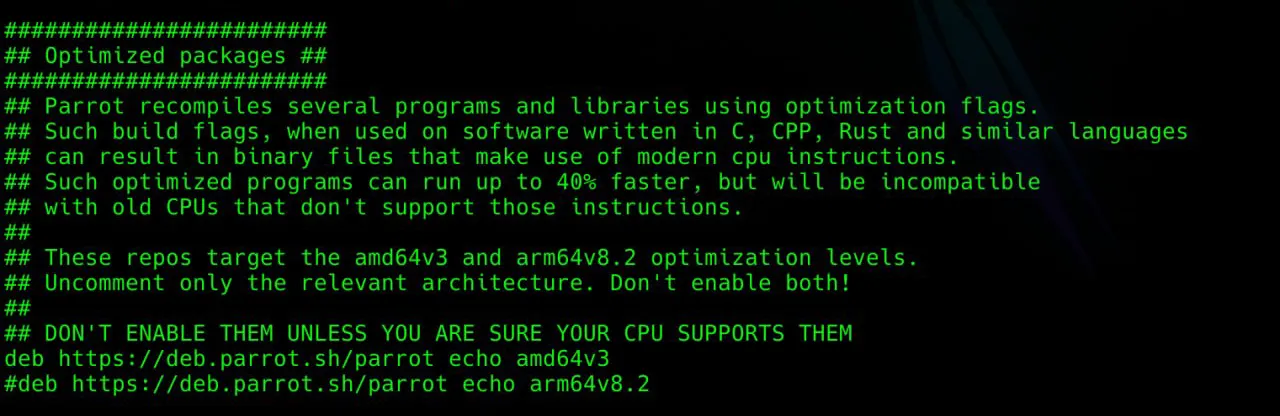
The optimized packages are published in dedicated, opt-in repository components. They coexist with the standard archive and do not replace or conflict with your existing system. When enabled, your package manager automatically prefers the optimized version of any package that has one; all other packages remain unchanged.
Which packages are currently optimized?
Section titled “Which packages are currently optimized?”Only a curated subset of the archive is optimized. Priority is given first to shared libraries that many other programs depend on (compression, cryptography, numerical, and parsing libraries), then to compute-heavy utilities (such as ffmpeg), and finally to other packages that benefit measurably. Packages that are I/O-bound or syscall-bound — network daemons, shells, and similar infrastructure — are intentionally left at the baseline because recompiling them yields no measurable benefit.
A note on source vs binary package names
Section titled “A note on source vs binary package names”The lists below give source package names. A single source package frequently produces several binary packages whose names differ slightly from the source name. For example, a source package abc might produce binaries such as abc, abc1, libabc1, abc-dev, and abc-doc. When a source package is optimized, all of the binary packages it produces are optimized. So if you are looking for a specific binary package, check which source package builds it (for example with apt-cache showsrc <binary-package> or dpkg-query -W -f='${source:Package}\n' <binary-package>).
Currently optimized (source packages)
Section titled “Currently optimized (source packages)”aom armnn arpack blenderbox2d btrfs-progs bullet bzip2cairo cairosvg capnproto ccacheceres-solver clamav containerd darktabledav1d eagerpy eigen3 expat
fdk-aac ffmpeg fftw fftw3flac flatbuffers flint frugally-deepgcc-14 ghostscript gimp gmpgnupg2 golang-github-containers-buildah gslhandbrake hdf5 icu imagemagick
inkscape jpeg-xl jq keras-applicationskeras-preprocessing krb5 lame lapacklibgcrypt20 libheif libjpeg-turbo librawlibsodium libtheora libvorbis libvpxlibxml2 libxslt libyaml libzstd
llvm-toolchain-19 lmdb lz4 maximamaxima-sage memcached mold mpfr4mupdf netcdf netcdf-cxx netcdf-fortrannetcdf-parallel nettle ninja-build nloptnss numpy obs-studio octave
openblas opencv openjdk-17 opuspari pcre2 pcre3 php8.4pixman plocate poppler protobufprotobuf-c python3.13 python-autoray python-einopspytorch qemu rawtherapee r-base
rclone rsync ruby3.3 runcrust-b3sum rustc ruy scikit-learnsilversearcher-ag simdjson singular snappysoundtouch sqlite3 suitesparse superlutesseract tiff vips vorbis-tools
wine x265 xapian-core xgboostxnnpack xxhash xz-utils yaml-cppargon2 brotli freetype gnutls28gzip libpng1.6 libwebp lzmamesa mpc nodejs ntl
openssl openjdk-21 openjdk-25 perlpigz recoll redis rust-brotlirust-ripgrep scilab scipy x264zlibCPU compatibility requirement
Section titled “CPU compatibility requirement”Important: Optimized builds require a CPU that supports the corresponding instruction set. Installing them on incompatible hardware will result in programs that crash with an illegal instruction error. The packages are designed to refuse installation on unsupported hardware, but you should verify compatibility before enabling the feature.
amd64v3 hardware requirements
Section titled “amd64v3 hardware requirements”Your CPU must support the x86-64-v3 instruction set. This is satisfied by:
- Intel: Haswell (4th-generation Core, 2013) or newer
- AMD: Excavator (2015) or Zen / Ryzen (2017) or newer
The following are not compatible: Intel Sandy Bridge and Ivy Bridge (2011–2012), 1st/2nd/3rd-generation Core, and pre-2013 Atom processors.
arm64v8.2 hardware requirements
Section titled “arm64v8.2 hardware requirements”Your CPU must support the ARMv8.2-A instruction set with the dot-product, FP16, and cryptography extensions. This is satisfied by:
- Apple M1 or newer (including all Apple Silicon Macs)
- Raspberry Pi 5 (Cortex-A76)
- AWS Graviton 2 or newer
- Qualcomm Snapdragon 845 or newer
- Most ARM server and laptop CPUs released from 2018 onward
The following are not compatible: Cortex-A72-class hardware (Raspberry Pi 3 and 4, AWS Graviton 1) and earlier ARMv8.0 cores.
Verifying your CPU is compatible
Section titled “Verifying your CPU is compatible”Before enabling the feature, confirm your processor supports the required instruction set.
Method A — the dynamic loader (recommended, amd64)
Section titled “Method A — the dynamic loader (recommended, amd64)”On a 64-bit Intel/AMD system, run:
/lib64/ld-linux-x86-64.so.2 --help | grep -A4 SubdirectoriesIf your CPU supports the v3 baseline, the output includes a line similar to:
x86-64-v3 (supported, searched)If x86-64-v3 is listed as supported, your machine is compatible with amd64v3.
Method B — inspecting CPU flags (works everywhere)
Section titled “Method B — inspecting CPU flags (works everywhere)”This method works regardless of glibc version and on both architectures.
For amd64v3, check that all of the following flags are present:
grep -m1 ^flags /proc/cpuinfo | grep -ow -e avx2 -e fma -e bmi1 -e bmi2 -e movbe -e f16cIf all six terms (avx2, fma, bmi1, bmi2, movbe, f16c) are printed, your CPU is compatible.
For arm64v8.2, check the ARM feature flags:
grep -m1 ^Features /proc/cpuinfo | grep -ow -e atomics -e asimddp -e fphp -e asimdhp -e aes -e sha2The terms correspond to LSE (atomics), dot-product (asimddp), FP16 (fphp, asimdhp), and cryptography (aes, sha2). If they are present, your CPU is compatible with arm64v8.2.
One-line compatibility check (amd64v3)
Section titled “One-line compatibility check (amd64v3)”grep -m1 ^flags /proc/cpuinfo | grep -qE 'avx2.*bmi2|bmi2.*avx2' && echo "compatible" || echo "not compatible"Enabling the optimized repository
Section titled “Enabling the optimized repository”After confirming compatibility, add the repository component for your architecture.
On a 64-bit Intel or AMD machine (amd64v3)
Section titled “On a 64-bit Intel or AMD machine (amd64v3)”Create the file /etc/apt/sources.list.d/parrot-optimized.list containing:
deb https://deb.parrot.sh/parrot echo amd64v3On a 64-bit ARM machine (arm64v8.2)
Section titled “On a 64-bit ARM machine (arm64v8.2)”Create the file /etc/apt/sources.list.d/parrot-optimized.list containing:
deb https://deb.parrot.sh/parrot echo arm64v8.2You can create the file in one step. For amd64v3:
echo 'deb https://deb.parrot.sh/parrot echo amd64v3' | sudo tee /etc/apt/sources.list.d/parrot-optimized.listFor arm64v8.2:
echo 'deb https://deb.parrot.sh/parrot echo arm64v8.2' | sudo tee /etc/apt/sources.list.d/parrot-optimized.listInstalling the optimized packages
Section titled “Installing the optimized packages”Once the repository is enabled, upgrade your system. The package manager will automatically replace any package that has an optimized variant available.
Using standard APT tooling:
sudo apt update && sudo apt full-upgradeOr using the dedicated Parrot helper:
sudo parrot-upgradefull-upgrade (rather than a plain upgrade) is recommended so that APT is permitted to resolve the package transitions cleanly.
Recognizing optimized packages
Section titled “Recognizing optimized packages”Optimized packages are easy to identify by their version suffix:
- amd64v3 packages carry
+amd64v3optimized1appended to their version string. - arm64v8.2 packages carry
+armv82optimized1appended to their version string.
During an upgrade, these suffixes appear in the list of packages being installed, so you can confirm at a glance that the optimized variants are being applied. To list the optimized packages currently installed:
dpkg -l | grep -E 'optimized1'To inspect a specific package’s installed version:
apt-cache policy <package-name>The optimized version will be listed with a higher priority than the standard version, which is why APT prefers it.
Why an optimized package may revert to the standard version
Section titled “Why an optimized package may revert to the standard version”It is normal and expected for an individual package to occasionally appear without its optimized suffix, even while the optimized repository is enabled. This is not a malfunction. There are three reasons it can happen, and in every case the system automatically returns to the optimized version once it becomes available again.
Reason 1 — A newer standard version is published
Section titled “Reason 1 — A newer standard version is published”The optimized component selects packages purely by version number. An optimized package such as 1.2.3-1+amd64v3optimized1 outranks the standard 1.2.3-1, so it is preferred. However, when a newer standard release 1.2.3-2 is published, that version outranks the older optimized one, so APT installs the standard 1.2.3-2 until the optimized rebuild of that same version is published. During this gap you safely run the standard package.
Reason 2 — Security updates
Section titled “Reason 2 — Security updates”Security fixes are published to the standard archive first, as quickly as possible. Because a security update raises the package version, it temporarily takes priority over the previously optimized package — exactly as in Reason 1. You always receive the security fix immediately, on the standard (unoptimized) package; the optimized rebuild of the patched version follows afterward. Security is never delayed for the sake of optimization.
Reason 3 — The optimized build failed and needs manual intervention
Section titled “Reason 3 — The optimized build failed and needs manual intervention”The optimized packages are produced by automated build workers. When a new version of a package is released, the workers attempt to rebuild it with the optimization flags. Occasionally a package fails to build under the optimized configuration — for example because of a new compiler-flag incompatibility, an architecture-specific assumption in the new code, or a test that does not pass in the optimized build environment. When this happens, no optimized variant is published for that version, and the system uses the standard package until a maintainer resolves the build manually and republishes the optimized version.
In all three cases, the practical effect is the same: the package temporarily loses its +amd64v3optimized1 / +armv82optimized1 suffix and runs as the standard build. No action is required from you; the optimized version returns automatically once it is rebuilt.
Verifying an installed binary is optimized
Section titled “Verifying an installed binary is optimized”To confirm that an installed library actually contains the optimized instructions, you can inspect it with objdump. For example, to check a shared object on amd64v3:
objdump -d /usr/lib/x86_64-linux-gnu/libzstd.so.1 | grep -m5 -E '(vfmadd|vpbroadcast|pdep|pext|sarx)'If the command returns matches, the binary contains AVX2/FMA/BMI2 instructions and is correctly optimized. On arm64v8.2, check for the corresponding instructions:
objdump -d /usr/lib/aarch64-linux-gnu/libzstd.so.1 | grep -m5 -E '(ldaddal|udot|sdot|fmla v)'Here ldaddal indicates LSE atomics and udot/sdot indicate the dot-product instructions.
Disabling optimized builds
Section titled “Disabling optimized builds”To revert to standard packages, remove the repository file and reinstall the affected packages from the standard archive.
sudo rm /etc/apt/sources.list.d/parrot-optimized.listsudo apt updatesudo apt full-upgradeBecause the standard archive always contains the baseline version of every package, APT will transition the optimized packages back to their standard counterparts on the next upgrade. If you want to force an immediate downgrade of a specific package, reinstall it explicitly:
sudo apt install --reinstall <package-name>Technical implementation details
Section titled “Technical implementation details”This section describes how the feature is implemented for users who want to understand the underlying mechanism. It is not required reading for normal use.
Repository components, not architectures
Section titled “Repository components, not architectures”The most important design decision is that optimized builds are delivered as repository components (in the same sense as main, contrib, and non-free), not as separate Debian architectures. The optimized packages retain the amd64 or arm64 architecture in their package metadata.
This matters because Debian architectures are effectively distinct ABIs, and the optimized instruction-set levels are not a new ABI — a v3 binary uses the same calling conventions, type sizes, and library layout as a baseline binary. Modeling the optimized builds as a separate architecture would have introduced multiarch path collisions (two packages competing to install the same files in the same library directory) and would have required patching the package manager. Delivering them as components avoids all of this.
Version-based selection
Section titled “Version-based selection”Each optimized package is built with a version string that appends a suffix to the standard version — +amd64v3optimized1 or +armv82optimized1. Under Debian’s version-comparison rules, a version such as 1.2.3-1+amd64v3optimized1 sorts higher than the standard 1.2.3-1, but lower than the next standard release 1.2.3-2.
This produces exactly the behaviour we want:
- When the optimized component is enabled, APT sees both the standard and optimized versions of a package and selects the optimized one because its version is higher.
- When a newer standard release appears upstream — including a security update — before the optimized rebuild has caught up, APT temporarily selects the standard version (because
1.2.3-2outranks1.2.3-1+amd64v3optimized1). The user silently and safely falls back to the baseline package until the optimized rebuild is published. This is correct and intentional, and is what guarantees that security fixes are never delayed by the optimization process. (See why an optimized package may revert.)
Because selection is driven entirely by standard version comparison, the feature requires no modifications to APT or dpkg.
Build infrastructure
Section titled “Build infrastructure”The optimized packages are produced by automated build environments configured to inject the appropriate compiler flags into every package build. The mechanism uses Debian’s standard build-flags system (dpkg-buildflags), so the flags are picked up automatically by any package using the standard debhelper build process — no per-package modification is required for the large majority of packages.
For the amd64v3 component, builds inject:
-march=x86-64-v3 -mtune=genericFor the arm64v8.2 component, builds inject:
-march=armv8.2-a+dotprod+fp16+crypto -mtune=neoverse-n1The -mtune value selects instruction-scheduling heuristics. For arm64 the generic-yet-modern neoverse-n1 profile is used because it matches the wide out-of-order pipeline design shared by the Apple, Qualcomm, and Neoverse cores that the component targets; it does not restrict which CPUs can run the binaries (that is governed solely by -march).
Languages with their own toolchains are handled separately: Go builds set GOAMD64=v3 (or the ARM equivalent) and Rust builds set the corresponding target-cpu / target-feature options, because these toolchains do not read the C/C++ build-flags system.
Because the rebuilds are automated, a new upstream version is recompiled with the optimization flags as soon as it is published. If that automated rebuild fails — due to a build-flag incompatibility, an architecture-specific issue in the new code, or a failing test in the optimized environment — no optimized variant is produced for that version, and the package falls back to the standard build until a maintainer intervenes. (See why an optimized package may revert.)
Hardware-compatibility guard
Section titled “Hardware-compatibility guard”To prevent the optimized packages from being installed on hardware that cannot execute them, the component employs a guard mechanism: a small support package performs a CPU feature check at installation time, and optimized packages declare a dependency on it. If the check fails on incompatible hardware, the installation aborts cleanly before any unusable binary is unpacked.
Caveats and known limitations
Section titled “Caveats and known limitations”-
The feature is experimental. Package coverage is being expanded over time, and you may encounter packages that are not yet optimized. The lists in the list of optimized packages are a snapshot and will change.
-
Not every package is optimized. We deliberately limit the optimized component to packages where the performance benefit is measurable — shared libraries, compute-heavy utilities, language runtimes, and databases. Network daemons, shells, and I/O-bound infrastructure are intentionally left at the baseline because recompiling them yields no measurable benefit.
-
Optimized packages may temporarily revert to the standard build. As described in why an optimized package may revert, this happens when a newer standard version is published, when a security update is released, or when an automated optimized rebuild fails and needs manual intervention. In every case the optimized version returns automatically once available, and no user action is required.
-
Security updates always take precedence. Security fixes are published to the standard archive immediately and are installed straight away, even if that means temporarily running the unoptimized build of a package. The optimized rebuild of the patched version follows afterward.
-
Packages with built-in runtime CPU dispatch see smaller gains. Some packages (notably glibc, OpenSSL, and parts of ffmpeg) already select optimized code paths at runtime based on the detected CPU. For these, the optimized rebuild improves only the surrounding code, so the gain is modest.
-
Third-party repositories are unaffected. The optimized component only affects packages published in it. Packages from other repositories continue to install their standard versions.
Frequently Asked Questions
Section titled “Frequently Asked Questions”Do I need to reinstall Parrot? No. The feature is enabled by adding a repository and upgrading. No reinstallation is required.
Why did one of my packages lose its optimized suffix after an update? This is expected. It happens when a newer standard version (including a security update) is published before the optimized rebuild catches up, or when the automated optimized rebuild of a new version fails and needs manual intervention. The optimized version returns automatically once it is rebuilt. See why an optimized package may revert.
Does this delay security updates? No. Security updates are delivered immediately on the standard package. If a package is temporarily unoptimized because of a security update, you still received the fix on time; the optimized rebuild simply follows afterward.
My package isn’t in the optimized list. Will it be added? Possibly. Coverage is expanding over time, prioritizing widely-shared libraries and compute-heavy software. The pipeline list in the list of optimized packages shows what is currently being prepared.
I found a binary package name that isn’t in the list, but a related one is.
The lists use source package names. One source package produces several binary packages (for example libabc1, abc-dev, abc-doc). If the source package is optimized, all of its binaries are. Use apt-cache showsrc <binary-package> to find the source package a binary comes from.
Can I use this on plain Debian? Yes. The components are self-contained and do not depend on Parrot-specific packages. They have been tested on stock Debian servers, particularly for compression and cryptographic workloads.
How much faster will my system be? It depends entirely on the workload. Compute-bound tasks (compression, encryption, hashing, media encoding, numerical computation) can see significant improvements from 20% up to 40% or 50% faster.. General desktop use and I/O-bound tasks see little to no difference, between 0% and 3%.
What happens if my CPU is not compatible? Programs built with unsupported instructions will terminate with an illegal instruction error. The system may crash, become unusable or refuse to boot, this is why you have to make sure that your cpu is supported before installing optimized packages.
A system held in a broke state can be recovered by booting it on another computer with a modern CPU that supports such new instructions.